A shared finance inbox is the email environment, typically billing@ or ar@, where accounts receivable teams manage invoice queries, disputes, remittances and payment conversations as a group rather than in individual mailboxes. Tools that automate it range from general-purpose email collaboration software to purpose-built AR platforms and AI agents that act inside the conversation. This guide compares the three categories against the criteria that matter specifically for accounts receivable, then sets out where Paraglide's agents fit and what results finance teams have reported.
What Is a Shared Inbox for Finance Teams?
A shared inbox is a centralised email environment that lets multiple team members access and manage messages sent to a single address, such as billing@ or accountsreceivable@, instead of routing them into personal mailboxes.
In accounts receivable, the shared inbox becomes the communication layer of the order-to-cash cycle. It handles invoice queries, payment reminders, disputes, deduction discussions, remittance confirmations and documentation requests. Most teams manage this inside Microsoft Outlook or Gmail, which centralises the messages but does not structure them: emails are stored and visible, but not prioritised, categorised or connected to invoice and customer data.
A shared inbox creates collaboration. On its own, it does not create execution.
What Problems Emerge as Shared Inbox Volume Grows?
Three structural weaknesses show up consistently once a shared inbox handles more than a few hundred conversations a week.
Ownership becomes unclear. Messages are visible to everyone and assigned to no one. Replies get missed or duplicated, and customers chase the same query twice because they cannot tell who is handling their case, which adds more inbound traffic on top of the original message.
Prioritisation follows time, not value. The newest email sits at the top regardless of financial impact, so a routine statement request can get answered before a dispute that is blocking a six-figure payment. Accounts receivable performance depends on value-at-risk prioritisation, not chronological sorting.
Repetitive queries consume disproportionate capacity. Invoice copy requests, statement requests, bank detail confirmations and basic status checks are legitimate but operationally repetitive. As volume grows, collectors spend more time drafting near-identical replies and less time on disputes or high-value accounts. This tracks with the broader picture the Hackett Group's U.S. Working Capital Survey found across the top 1,000 US publicly traded non-financial companies: 83% have not fully automated their accounts receivable operations, which is consistent with manual inbox work still absorbing a disproportionate share of AR capacity (Hackett Group data, cited in PYMNTS, April 2026).
Why Don't Ticketing Systems Solve the Finance Inbox Problem?
Ticketing systems bring structure, but they were built for IT support and customer service, not accounts receivable, and that mismatch shows up quickly in AR workflows.
Finance conversations evolve over weeks: a customer partially pays an invoice, raises a deduction later, then reopens the discussion with new documentation. In a ticketing system this can fragment into several disconnected tickets, breaking the history. Tickets get closed before payment lands, and follow-ups queue behind SLAs optimised for response speed rather than cash resolution.
Ticketing platforms also don't natively understand finance context. They don't recognise invoice numbers, dispute types, credit limits or value-at-risk by default, so teams compensate with manual tagging and cross-checking against the ERP, which leaves the underlying workflow just as fragmented as before. Ticket metrics measure closure and response time. Finance metrics measure cash collected, disputes resolved and DSO reduced. Optimising for the first does not guarantee the second.
What Are the Best Tools to Automate a Shared Finance Inbox in 2026?
The right tool depends on whether a team needs a shared mailbox, a workflow layer on top of one, or an agent that resolves the conversation itself, and each of the three categories below answers a different version of that need.
When evaluating options, five criteria matter most for AR specifically:
Inbound resolution, not just outbound scheduling. Does the tool answer routine billing queries directly, or only remind customers to pay?
Finance context. Can it read invoice numbers, PO references, dispute reasons and payment history, or does it treat every email as generic text?
Two-way conversation handling. Does a reply to a reminder get picked up automatically, or does it drop back into a human inbox?
ERP and billing system integration. Does it connect to systems such as SAP, Oracle, NetSuite, Microsoft Dynamics 365 Finance & Operations, Business Central, Sage, Infor, IFS, Odoo, QuickBooks or Xero, or does it require manual export/import?
Commitment tracking. Does it capture and monitor promise-to-pay dates automatically, or rely on someone logging them in a spreadsheet?
Shared Inbox and AR Automation Tools, by Generation
Category | Examples | How they handle the inbox | Inbound query resolution | Best suited to |
|---|
Generic email/helpdesk tools | Front, Missive, Help Scout, Zendesk, Freshdesk | Centralise messages, assign owners, track SLAs | Manual drafting; no invoice, dispute or credit context | Small teams that need shared visibility but have low AR-specific complexity |
Gen 1: legacy AR platforms (20+ years old) | Highradius, Esker, Billtrust, Emagia, Corcentric, Onguard, Serrala, Quadient (YayPay) | Rule-based dunning and collector worklists layered on the ERP | Outbound reminders only; replies route back to a person in the shared inbox | Large enterprises with heavy SAP/Oracle estates and existing rules-engine investment |
Gen 2: SaaS collections platforms (2010-2020) | Chaser, Tesorio, Growfin, Invoiced, Paidnice, Gaviti, Satago, Credithound, MyDSOManager, ezyCollect, Cevinio, Creditpoint, Debtor Daddy | Templated reminder sequences with workflow, dashboards and reporting | Improved scheduling and visibility, but replies still land back in a human inbox for someone to answer | Mid-market teams wanting workflow and reporting without replacing the ERP |
Gen 3: AI-native agents | Paraglide | Agents operate inside the email thread itself: reading, replying, triaging and escalating | Routine queries resolved directly; disputes, deductions and promise-to-pay dates are captured and tracked automatically | High-volume B2B teams where inbound query volume, not reminder volume, is the constraint on DSO |
The first two generations were built to send messages out. The third was built to read what comes back. That distinction, not interface design, is what determines whether a shared inbox tool actually reduces the manual work behind it.
What Do These Tools Cost?
Pricing models differ by generation more than by vendor within a generation. Generic email/helpdesk tools price per seat, per month: as of August 2026, Front lists $25-$105 per seat monthly across its Starter, Professional and Enterprise tiers, Missive lists $14-$36 per user monthly, and Help Scout lists $25-$75 per user monthly, with AI features frequently sold as separate add-ons on top (Front's AI Copilot add-on is $20/seat/month, for example). Gen 2 SaaS collections platforms tend to price per account rather than per seat: Chaser's published tiers run from $259 to over $1,199 a month depending on entity count and features, with unlimited users included even on lower tiers. Gen 1 legacy AR platforms are usually licensed per module or per user, with separate implementation fees that can run into the tens of thousands. Paraglide is priced on a custom, volume-based basis tied to email and conversation volume rather than per seat, since the goal is to remove seats from the equation, not add a licence for each one; get an exact figure via a demo. Vendor pricing changes frequently, confirm current figures on each provider's pricing page before publishing.
See how Paraglide's agents compare to a legacy or SaaS collections platform inside your own inbox. Book a demo →
Why Don't Generic Shared Inbox Tools Like Front, Missive or Help Scout Work for Accounts Receivable?
Generic shared inbox tools such as Front, Missive, Help Scout and Crisp are built for customer support and general team communication, not for accounts receivable, so they centralise billing emails without understanding what's inside them.
These platforms are genuinely strong at what they're built for: assigning conversations, internal chat alongside email, shared drafts, and support-style SLAs. What they don't have is a finance data model. None of them natively recognise an invoice number, a PO reference, a dispute reason code or a promise-to-pay date, because that isn't the problem they were designed to solve. A billing query routed through one of these tools still needs a person to open the ERP, look up the invoice, and draft the reply by hand; the tool has organised the conversation but not resolved it.
That gap matters more as invoice volume rises. A support inbox tool measures success by first-response time and ticket closure. An AR team needs promise-to-pay dates captured, disputes categorised against policy, and follow-ups triggered automatically when a commitment lapses, none of which a general-purpose shared inbox is built to do without significant custom workflow configuration bolted on afterwards. Teams that start with a generic shared inbox for AR usually end up layering a second, finance-specific tool on top of it once volume grows, rather than replacing it outright.
Which Shared Inbox Category Is Right for Your Team?
The right starting point depends on invoice volume and query complexity more than company size alone.
Low email volume, mostly internal collaboration: a generic shared inbox (Front, Missive, Help Scout) is usually enough if billing queries are occasional and low in complexity.
High invoice frequency, SAP or Oracle already in place: a Gen 1 legacy AR platform may already be licensed; the gap to close is inbound query resolution, not outbound reminders.
Mid-market team wanting workflow and reporting without an ERP overhaul: a Gen 2 SaaS collections tool adds structure to outbound reminders, but replies will still need manual handling.
High-volume B2B team where inbound queries, not reminders, are the bottleneck: an AI-native agent that operates inside the thread, such as Paraglide, directly resolves routine queries and tracks commitments rather than routing everything back to a person.
Shared Inbox vs AI-Native Shared Inbox: What's the Difference?
A traditional shared inbox centralises communication; an AI-native shared inbox manages it, interpreting messages, drafting or sending responses where appropriate, and pushing conversations toward resolution instead of just storing them.
Area | Traditional shared inbox | AI-native shared inbox |
|---|
Message handling | Manual triage and response | Automatic triage and contextual responses |
Invoice and statement requests | Retrieved and resent manually | Retrieved and sent without a person drafting each reply |
Payment reminders | Scheduled templates | Personalised two-way conversations |
Promise-to-pay tracking | Logged manually | Captured and monitored automatically |
Dispute management | Buried in threads | Categorised and routed with visibility |
Follow-ups | Dependent on available headcount | Triggered systematically when a commitment lapses |
Scalability | Headcount-driven | Volume-driven |
Performance insight | Inbox visibility only | Commitment and response tracking data |
How Do AI Agents Manage Billing and Collections in the Finance Inbox?
The constraint inside a shared inbox is rarely visibility, it's volume and constant context switching between billing and collections within the same threads: an invoice reminder can surface a dispute, a dispute clarification can produce a new payment commitment, and a short-payment explanation can trigger a deduction claim.
On the inbound side, agents interpret intent and respond in context. Routine requests, such as invoice copies or statements, are resolved as they arrive. When a deduction or dispute is raised, it's categorised, summarised and surfaced appropriately, and high-impact cases are prioritised by value or risk rather than by timestamp.
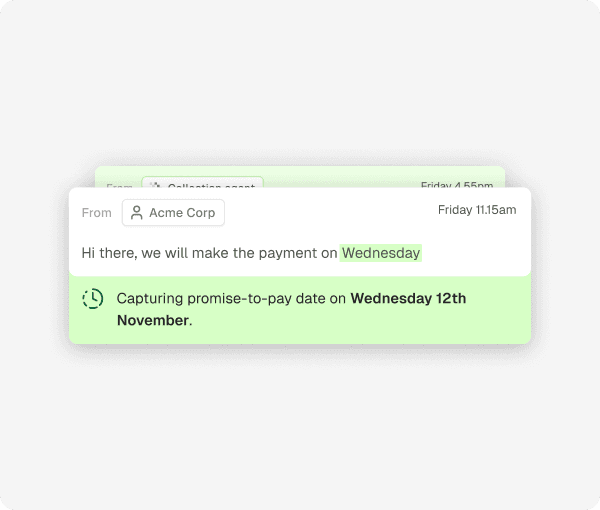
On the outbound side, agents structure collections follow-ups: reminders are personalised to account context and prior communication, a promise-to-pay date volunteered by a customer is captured automatically, and if that date passes without payment, a follow-up is triggered without anyone tracking it manually.
Within an AR shared inbox, agents can:
Respond to routine billing queries as they land in the inbox
Retrieve and send invoices or statements without manual drafting
Capture and monitor promise-to-pay dates
Trigger structured follow-ups when a commitment lapses
Identify disputes, deductions and short payments
Route complex cases to human collectors with full context attached
Repetitive interactions get handled without a person drafting each one, so collectors spend their time on negotiation, credit decisions and high-value accounts instead of copy-pasting invoice PDFs.
How Paraglide Automates the Shared Finance Inbox Across the Full AR Cycle
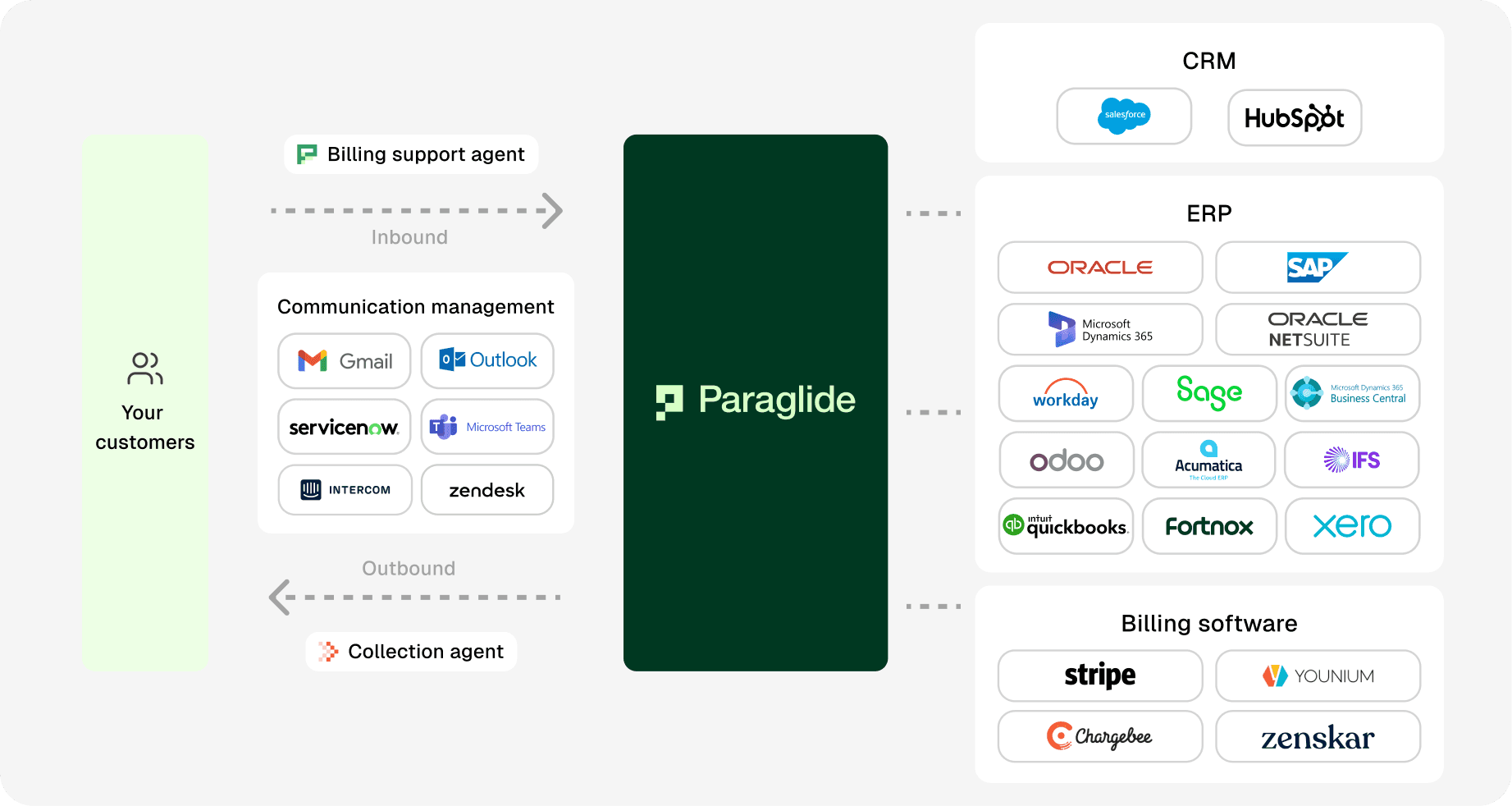
Paraglide connects a team's existing shared inbox to four agents that work across the whole order-to-cash conversation, not just one slice of it, which is the main gap between Paraglide and both legacy and SaaS collections tools.
Billing support agent: works inside the finance inbox to resolve billing queries in any language, triage disputes, and capture promise-to-pay dates and remittances.
Collection agent: manages the full two-way collections conversation, outreach, replies and follow-ups, from the first reminder through to debt recovery.
Reconciliation agent (cash application): reads remittances in any format and matches the payments that rule-based engines reject, wrong references, missing digits, short payments and bulk transfers, and checks deductions against policy.
Supplier portal agent: logs into supplier portals through the browser to upload invoices, match PO numbers, track status, resolve rejections and download remittances and timesheets across Ariba, Coupa, Tungsten and dozens of others.
Those four agents map onto the use-cases that actually generate shared inbox volume: the AR inbox itself, collections, cash application, disputes, deductions and credit. When a customer requests a copy invoice, it's sent without a person opening the ERP. When a payment date is agreed, it's captured and monitored, and if that date passes without payment, follow-up is triggered without manual tracking. Disputes and deductions are categorised and surfaced internally with full visibility, and cases that need judgment are handed to a human collector with the relevant history attached rather than a blank thread.
Human-in-the-loop controls mean finance teams keep oversight and approval authority throughout. The agents extend collector capacity and standardise execution across thousands of conversations rather than replacing the judgment calls that still need a person.
See the billing support agent in your own inbox →
What Do Finance Teams Say After Switching to an AI-Native Shared Inbox?
Finance leaders who've deployed AI agents in their shared inbox describe the immediate change as clearing a backlog, not learning a new tool, since the agent works inside the mailbox they already had.
A Finance Operations Manager at GetAccept, previously "drowning in billing queries" with hundreds of open cases, reported reaching inbox zero in the first week of using Paraglide's billing support agent. At Teamtailor, leadership noted that the agent's replies were accurate enough that the team felt comfortable letting it handle routine queries without drafting each one by hand. Independently, Paraglide holds a 5.0 out of 5 rating across published G2 reviews (9 reviews as of August 2026), with reviewers citing inbox zero, faster collections and reduced AR headcount needs as recurring themes, so this isn't limited to the two accounts quoted above.
What Results Can Finance Teams Expect From an AI-Native Shared Inbox?
Reported results vary by starting point, but the customers Paraglide has published results for cluster around three outcomes: faster resolution, reduced ageing, and less manual inbox work.
Customer | Role | Reported result |
|---|
Choco | Finance Director | 34% reduction in DSO within 14 days |
Gorilla Gasket | Owner | 38% reduction in ageing across multi-invoice accounts |
Spiideo | CFO | 43% reduction in invoices over 30 days past due |
GetAccept | Finance Operations Manager | Reached inbox zero in the first week after deployment |
These customer-reported figures sit close to independent benchmarks. The Hackett Group's U.S. Working Capital Survey of the top 1,000 US publicly traded non-financial companies found $1.7 trillion trapped in excess working capital overall, with roughly $600 billion of that specifically attributable to accounts receivable; it also found purpose-built AR platforms deliver an average 23% reduction in DSO and 25% reduction in days to pay, rising to a 34% combined reduction when invoicing, payments and collections operate as one connected system rather than as separate tools (Hackett Group data, cited in PYMNTS, April 2026). That 34% figure lines up closely with the DSO reduction Paraglide customers report, which is what you'd expect if the mechanism driving it, connecting the inbox, the collections conversation and the ERP into one workflow rather than three, is the same one Hackett's data points to.
How Do You Move From a Shared Inbox to an AI-Native Shared Inbox?
Moving from a manually managed shared inbox to an AI-native one is typically a matter of days, not months, because the agents connect to the existing mailbox rather than replacing it.
Connect the existing inbox. The agent connects to billing@ or ar@ directly; customers keep emailing the same address.
Connect the ERP and billing systems. Integration with systems such as SAP, Oracle, NetSuite, Microsoft Dynamics 365 Finance & Operations, Business Central, Sage, Infor, IFS, Odoo, QuickBooks or Xero gives the agent invoice, customer and payment context.
Set human-in-the-loop rules. Decide which reply types go out automatically and which need approval, and adjust this over time as confidence grows.
Go live on routine queries first. Invoice copies, statements and status checks are the lowest-risk starting point, typically live within three days.
Expand into disputes, deductions and collections follow-ups once the team can see the agent's triage and response quality on routine volume.
Track commitment and resolution data, not just inbox visibility, to measure whether the shared inbox is actually shortening DSO.
The Future of the Finance Shared Inbox
The shared inbox for finance teams is no longer just a collaboration tool, in modern accounts receivable functions it's the operational centre of collections performance.
The shift from a traditional shared mailbox to an AI-native one is structural: instead of relying solely on human bandwidth, finance teams get a scalable execution layer built directly into the communication channel they already use. As order-to-cash complexity increases and invoice frequency rises, an inbox managed entirely by hand becomes the constraint on how fast a team can get paid.
Finance is already moving faster on this than most other functions. PYMNTS Intelligence's Enterprise AI Benchmark Report found 90% of financial services firms had scaled AI tools in payments and finance functions as of August 2026, ahead of healthcare (63%) and media (43%) (PYMNTS, August 2026). That pattern matches what Gartner found when it surveyed 204 finance leaders in March 2026: 45% of finance AI investment is currently aimed at productivity gains rather than decision quality (Gartner, July 2026), which is exactly the category a manually managed shared inbox falls into. When agents manage billing and collections conversations at scale, shared inbox management becomes a working capital lever rather than an administrative task.